# Document Generation
The Document Generation API creates documents from templates with variable substitution, image embedding, Excel output and asynchronous jobs.
[[API Docs](/api/document)]
[[SDK](https://www.npmjs.com/package/@epilot/document-client)]
## Overview
The Document Generation API creates documents from templates with dynamic variable substitution. It supports multiple input and output formats, image embedding, Excel generation, and async processing with job tracking.
```mermaid
flowchart LR
Template[Template\n.docx / .xlsx] --> API[Document API]
Entity[Entity Data] --> API
Variables[Variable Payload] --> API
API --> PDF[PDF Output]
API --> DOCX[DOCX Output]
```
## API Endpoints
### Extract Template Metadata
Extract metadata and variables from document templates.
**Endpoint:** `POST /v2/documents:meta`
**Supported formats:** `.docx`, `.doc`, `.xlsx`, `.xls`, `.xlsm`
```json title="Request"
{
"template_document": {
"s3ref": {
"bucket": "epilot-files-prod",
"key": "123/templates/contract-template.docx"
}
}
}
```
```json title="Response"
{
"page_margins": {
"top": 1440,
"bottom": 1440,
"left": 1440,
"right": 1440,
"header": 720,
"footer": 720
},
"variables": [
"customer_name",
"order.billing_contact.0.salutation",
"items[0].description",
"opportunities[Primary].value"
]
}
```
### Generate Documents
Generate documents from templates with variable substitution.
**Endpoint:** `POST /v2/documents:generate`
**Input formats:** `.docx`, `.xlsx`, `.xls`, `.xlsm`, `.ics`
**Output formats:** `.pdf`, `.docx`, `.xlsx`, `.ics`
**Query parameters:**
| Parameter | Values | Default | Description |
|-----------|--------|---------|-------------|
| `job_id` | string | -- | Track async generation status |
| `mode` | `partial_generation`, `full_generation` | `full_generation` | Generation flow type |
| `preview_mode` | `open`, `download` | `open` | Preview behavior |
```json title="Request"
{
"template_document": {
"s3ref": {
"bucket": "epilot-files-prod",
"key": "123/templates/invoice-template.docx"
},
"filename": "invoice-template.docx"
},
"context_entity_id": "550e8400-e29b-41d4-a716-446655440000",
"user_id": "user_123",
"language": "en",
"variable_payload": {
"custom_field": "Override value",
"discount": 15
},
"template_settings": {
"top_margin": 1440,
"bottom_margin": 1440,
"show_guidelines": false
}
}
```
```json title="Response"
{
"job_id": "job_550e8400",
"job_status": "SUCCESS",
"pdf": {
"s3ref": {
"bucket": "epilot-generated-documents",
"key": "123/output/invoice.pdf"
},
"preview_url": "https://s3.amazonaws.com/...",
"filename": "invoice.pdf"
},
"docx": {
"s3ref": {
"bucket": "epilot-generated-documents",
"key": "123/output/invoice.docx"
},
"preview_url": "https://s3.amazonaws.com/...",
"filename": "invoice.docx"
},
"variable_payload": {
"customer_name": "John Doe",
"custom_field": "Override value",
"discount": 15
}
}
```
### Convert Documents
Convert documents between formats (currently DOCX to PDF).
**Endpoint:** `POST /v2/documents:convert`
```json title="Request"
{
"input_document": {
"s3ref": {
"bucket": "epilot-files-prod",
"key": "123/documents/contract.docx"
}
},
"output_format": "pdf",
"output_filename": "contract-converted.pdf",
"language": "en"
}
```
```json title="Response"
{
"output_document": {
"s3ref": {
"bucket": "epilot-generated-documents",
"key": "123/converted/contract-converted.pdf"
},
"preview_url": "https://s3.amazonaws.com/...",
"filename": "contract-converted.pdf"
}
}
```
## Template Variables
### Basic Variable Syntax
Templates use double curly braces for variable substitution:
```
{{variable_name}} // Simple variable
{{customer.name}} // Nested object
{{address.street.number}} // Deep nesting
{{items.0.price}} // Alternative array syntax
{{opportunities[Primary].value}} // Label-lookup array access
{{data["special-key"]}} // Bracket notation for special characters on Label Lookups
```
### Variable Resolution Order
Variables resolve in this precedence order (highest first):
1. `variable_payload` -- explicitly provided values
2. `context_data` -- additional context data
3. Entity attributes from `context_entity_id`
4. User preferences (language) from `user_id`
### Complex Variable Examples
```
// Customer information
{{customer.first_name}} {{customer.last_name}}
{{customer.address.0.street}}
{{customer.contacts[billing].email}}
// Order details with calculations
{{ calc "ROUND((price * qty) * (1 - discount), 2)" }}
{{order.total_amount}}
// Conditional display (in supported templates)
{{#has_discount}}
Discount: {{discount_percentage}}%
{{/has_discount}}
```
You can find more examples about calculation variables [here](https://docs.epilot.io/docs/templates/template-variables#excel-like-formulas).
## Image Variables
### Basic Image Syntax
Images can be embedded in documents using the special syntax:
#### Direct Image URL
```
{{% image_url }}
```
This renders the image at its original size.
#### Image with Size Control
Use an image placeholder in your template and set the variable in the alt text:
1. Insert an image placeholder in your Word/Excel template
2. Set the alt text to: `{{% image_url }}`
3. The placeholder image dimensions will control the rendered size
### Image Loops and Collections
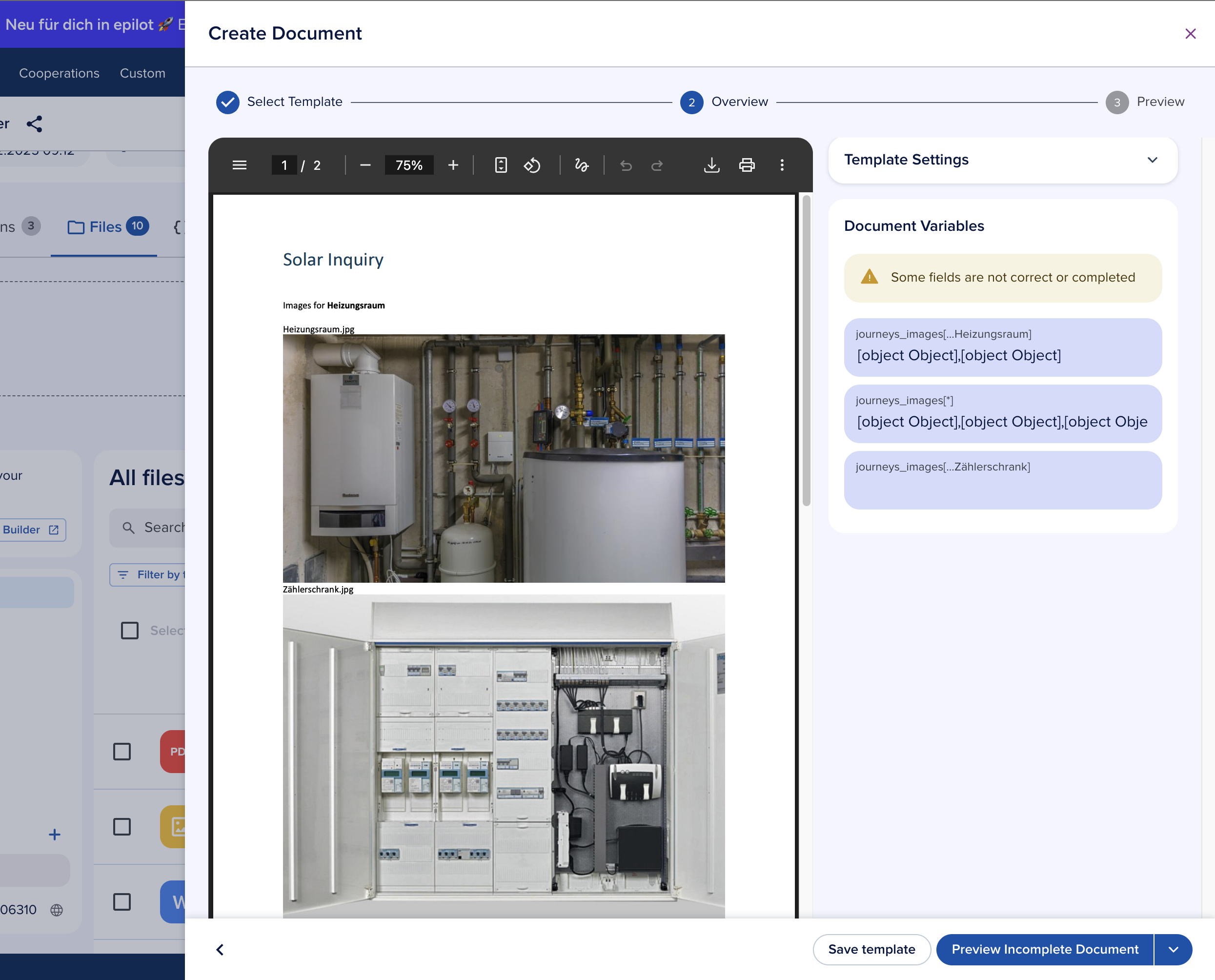
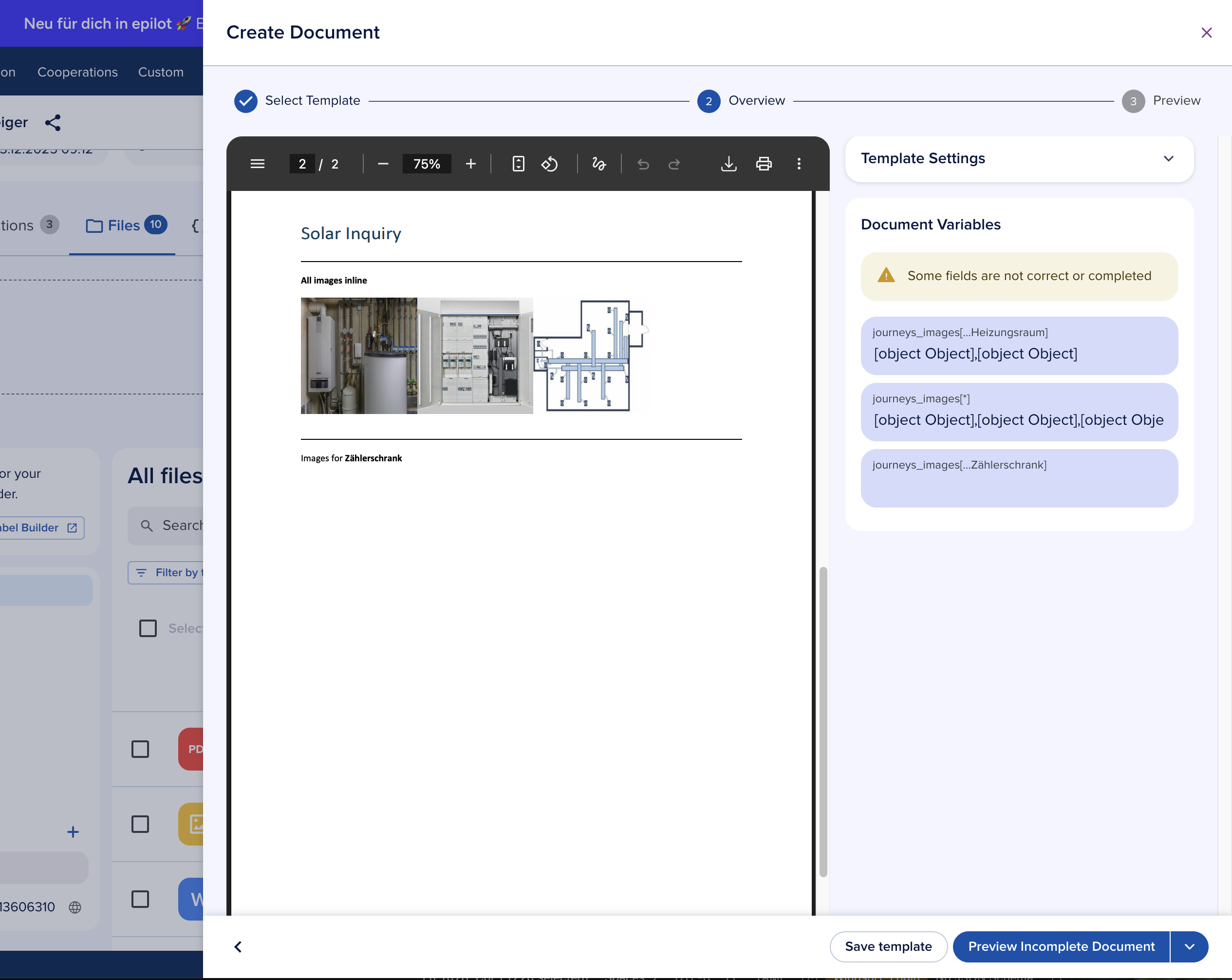
#### Mapping Journey Submissions to File Attributes
Since the global `_files` attribute is not yet supported, you need to map Journey submission fields to file attributes. For example, map a journey field to `my_journey_images`.
#### Basic Image Loop
```
{{#my_journey_images[*]}}
{{% public_url }}
{{/my_journey_images[*]}}
```
This iterates through all images in the collection.
#### Filtered Image Loop by Label
```
{{#my_journey_images[...solar-panel]}}
{{% public_url }}
{{/my_journey_images[...solar-panel]}}
```
This only includes images with the label "solar-panel".
#### Complete Example with Formatting
```
{{#property_images[*]}}
Property Image:
{{% public_url }}
Description: {{ _title }}
Uploaded: {{ _created_at }}
{{/property_images[*]}}
```
### Automatic Public URL Generation
The service automatically handles private images by converting them to signed URLs with temporary access credentials. These URLs expire shortly after document processing completes.
> **Warning: **Order tables with margin corrections are incompatible with loops.** Templates using `{{~order_table mt=2 mb=2}}` cannot include image loops or any `FOR_LOOP` constructs. Remove margin correction variables and adjust margins directly in Word's built-in settings instead.**
## Excel Generation
### Excel Template Support
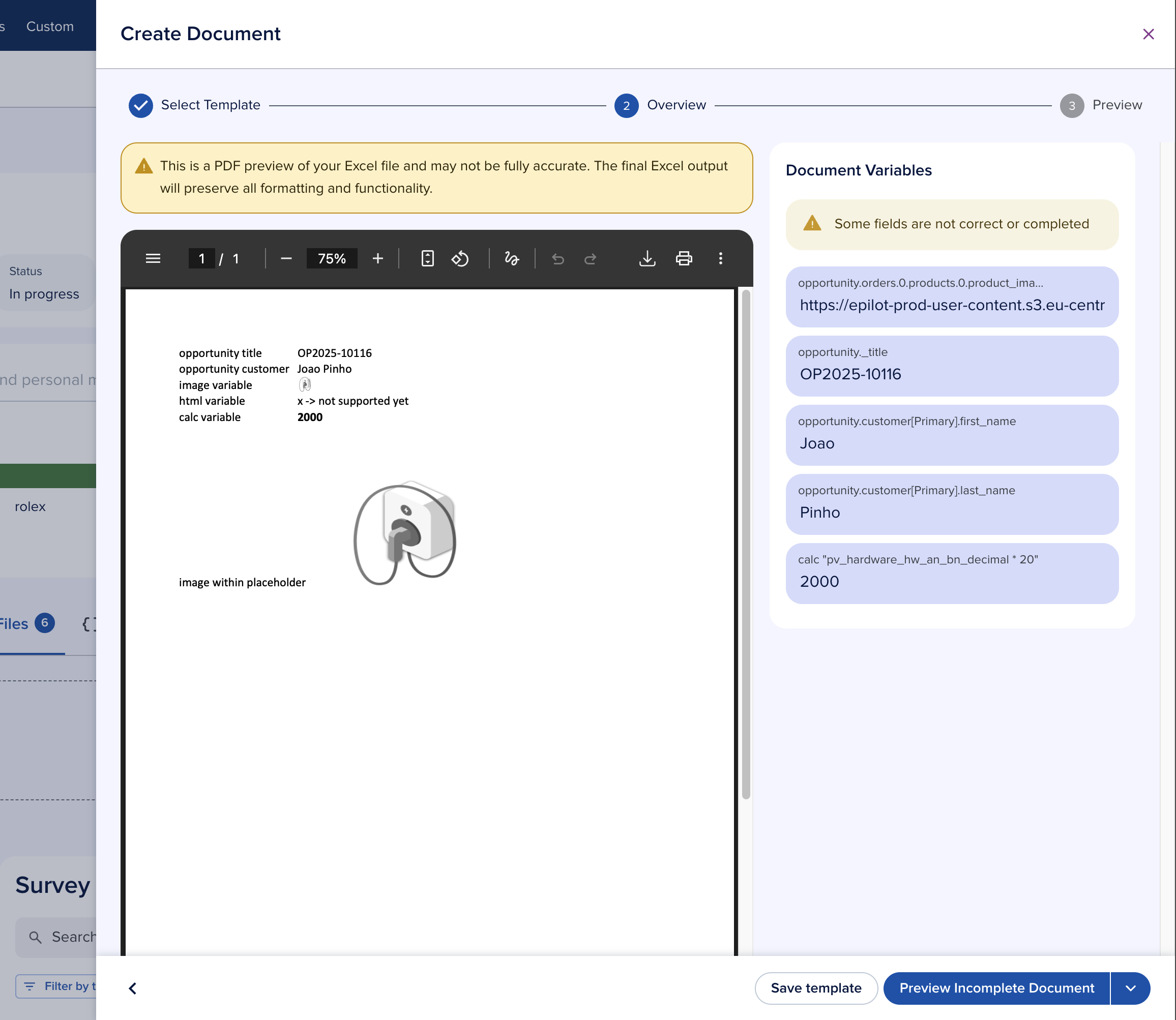
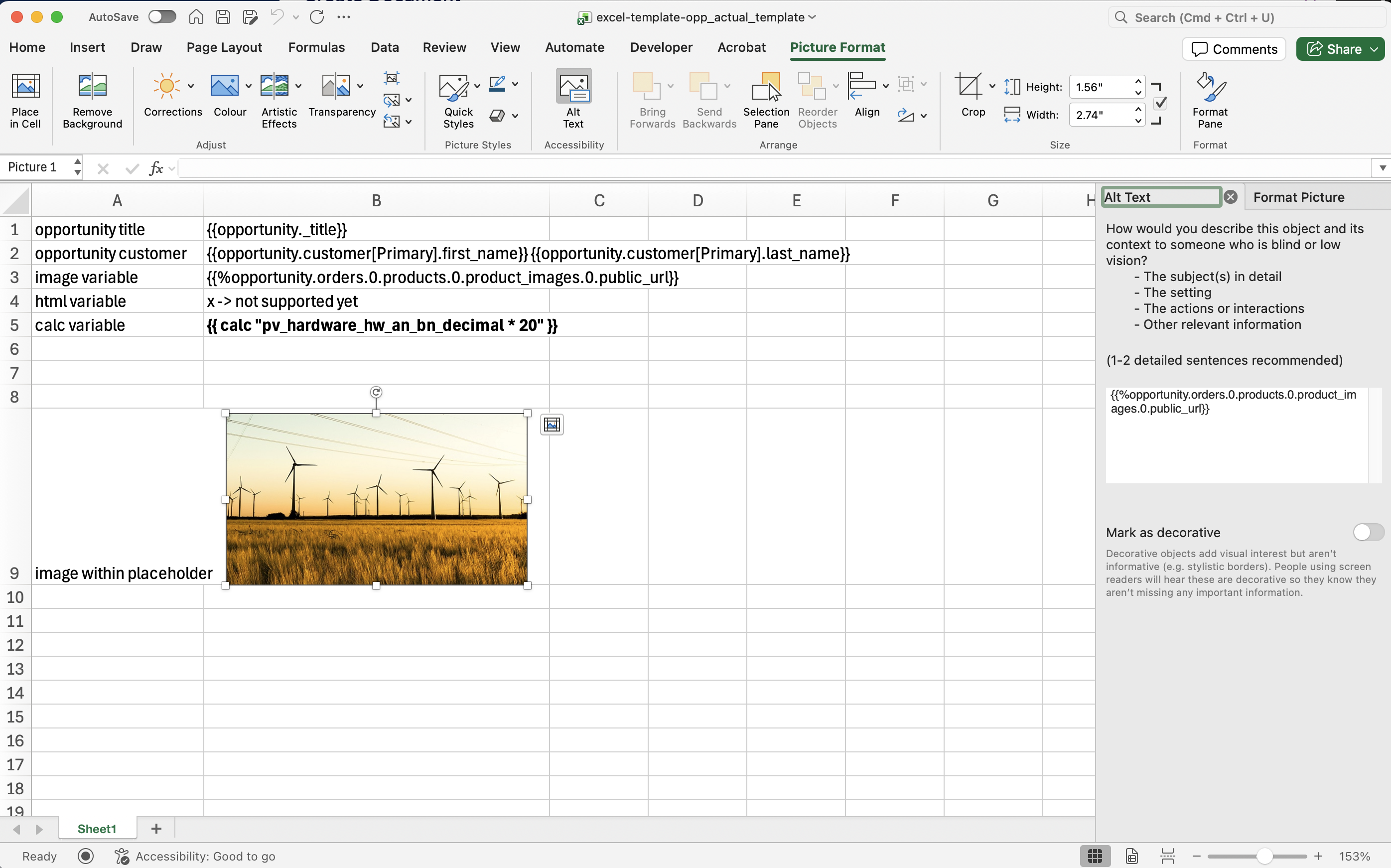
The Document Generation API supports Excel templates with:
- Variable substitution in cells
- Formula preservation (recalculation is not supported due to Excel's security model)
- Image embedding in spreadsheets
> **Note: Order Table variables are not supported in Excel templates due to Excel's limitations with direct HTML rendering.**
### Excel Variable Syntax
#### Cell Variables
```
A1: {{customer_name}}
B1: {{order_date}}
```
#### Images in Excel
```
Cell A1: {{% product_image }}
Cell B2: {{% chart_url }}
```
### Excel Generation Example
**Request:**
```json
{
"template_document": {
"s3ref": {
"bucket": "epilot-files-prod",
"key": "templates/report-template.xlsx"
}
},
"context_entity_id": "550e8400-e29b-41d4",
"variable_payload": {
"report_title": "Q4 Sales Report",
"sales_data": [
{"month": "October", "revenue": 125000},
{"month": "November", "revenue": 145000},
{"month": "December", "revenue": 168000}
],
"chart_image": "https://charts.example.com/q4-sales.png"
}
}
```
## Troubleshooting
Variables not replaced
- Verify `{{}}` bracket syntax
- Check that the variable exists in the payload or entity
- Remember that `variable_payload` overrides entity data
Image not rendering
- Use `{{% url }}` with the correct syntax
- Confirm the image URL is accessible
- When using label filters, verify images have the correct labels
Loop syntax errors
- Use `[*]` for all items, `[...label]` for filtered
- Ensure matching opening and closing loop tags
- Remove `{{~order_table mt=2 mb=2}}` when using loops
## Code Examples
### cURL
```bash title="Extract template metadata"
curl -X POST https://api.epilot.cloud/v2/documents:meta \
-H "Authorization: Bearer $TOKEN" \
-H "Content-Type: application/json" \
-d '{
"template_document": {
"s3ref": {
"bucket": "epilot-files-prod",
"key": "templates/contract.docx"
}
}
}'
```
```bash title="Generate a document"
curl -X POST https://api.epilot.cloud/v2/documents:generate \
-H "Authorization: Bearer $TOKEN" \
-H "Content-Type: application/json" \
-d '{
"template_document": {
"s3ref": {
"bucket": "epilot-files-prod",
"key": "templates/invoice.docx"
}
},
"context_entity_id": "550e8400-e29b-41d4-a716-446655440000",
"variable_payload": {
"custom_message": "Thank you for your business!"
}
}'
```
### Template Settings
Customize document margins and appearance:
```json title="template_settings"
{
"template_settings": {
"top_margin": 1440,
"bottom_margin": 1440,
"left_margin": 1080,
"right_margin": 1080,
"show_guidelines": false,
"enable_headers": true,
"enable_footers": true
}
}
```
### Async Job Tracking
For large documents, poll the generation endpoint with the returned `job_id`:
```typescript
const { job_id } = await client.generateDocument({ ... });
const poll = async (jobId: string) => {
const res = await client.generateDocument({ job_id: jobId });
if (res.job_status === 'SUCCESS') {
return res.pdf.preview_url;
} else if (res.job_status === 'FAILED') {
throw new Error('Generation failed');
}
// Still processing -- retry after delay
await new Promise((r) => setTimeout(r, 2000));
return poll(jobId);
};
```