Outlook (Microsoft 365) integration
Connect your Microsoft 365 account (tenant) to epilot so your shared mailboxes work inside epilot the same way native epilot mail does: searchable, assignable, and available to workflows.
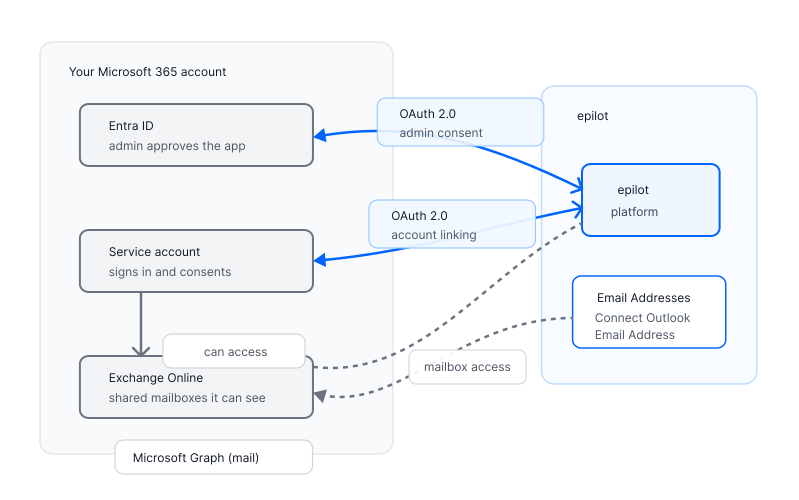
The integration happens safely between our APIs and Microsoft Graph API. epilot talks to Microsoft Graph over OAuth 2.0; giving you full control over access and permissions.
What you can do today
- Connect your Microsoft 365 account
- Sync shared mailboxes (Inbox and Sent Items), with an initial historical backfill on first connect and live updates after that.
- Send mail from a connected shared mailbox – the message appears in Outlook's Sent Items as if it had been sent from Outlook directly.
Outlook Calendar sync, plus Teams presence and meetings, are on the roadmap but not yet available.
Who configures what
| Role | What they do |
|---|---|
| Microsoft 365 tenant admin | Grants admin consent once. Owns which mailboxes the connecting account can reach in Exchange. Can revoke at any time from Entra. |
| epilot organisation admin | Connects the service account via "epilot Outlook Connector" app, picks the shared mailboxes to expose in epilot, assigns inboxes to groups/teams or people. |
| epilot users | Read and reply to customer email alongside the rest of the customer's epilot data – opportunities, contracts, journeys. |
Where to go next
- Setup – the admin-consent and connect flow.
- Mail – what gets synced, how sending works, what to expect in the UI.
- Security & Privacy – identities, scopes, data flow, encryption, retention.