Agent Toolkit for epilot
epilot offers the Agent Toolkit so that third-party AI assistants — Claude, Codex, ChatGPT, and others — can work with epilot for you. Connect it once, and your AI assistant can answer questions about how your organization is set up ("Which journeys feed into this workflow?") and build or change configuration on your behalf ("Create a workflow for new solar orders") — in plain language, no API knowledge required.
The toolkit is packaged as a plugin following the open Agent Plugins specification, a vendor-neutral standard for extending AI assistants. A plugin bundles two kinds of things:
- Skills — written know-how the assistant reads before it acts: epilot's concepts, decision rules, and proven step-by-step workflows. Skills make the assistant work the epilot way instead of guessing.
- MCP servers — live tools (via the Model Context Protocol) the assistant calls to look up your organization's real configuration and to create or update things — always with your explicit approval, and read-only unless you opt into write access. Entity data the assistant reads is PII-anonymized by default.
The first time you install the plugin — or call an epilot MCP tool — you are redirected to the epilot login: sign in, pick the organization the assistant should work with, and choose the access level. Read-only is preselected; read & write is an explicit choice.
Beta
The Agent Toolkit and the epilot MCP server are available in Beta on all epilot plans. Your use is subject to your epilot agreement and to epilot's terms for beta features: beta features are provided without a service level commitment, and their scope and behavior can change or be withdrawn. Changes to the tool surface are listed in the MCP server changelog. Share feedback and requests in the agent-toolkit-for-epilot repository.
This demo shows the epilot MCP Server being used in ChatGPT and Claude (unmute for audio):
Where can you use it?
The full plugin — skills included — works in all major AI clients: Claude (Claude.ai, Claude Desktop, Claude Cowork, and Claude Code), ChatGPT and Codex, and any other client that implements the Agent Plugins standard. In managed workspaces, an administrator imports the plugin once and users install it from the plugin menu of their client. If you only need the live tools, or your client offers connectors but no plugins (for example Cursor or a custom agent), connect the epilot MCP server directly as a connector instead — that gives the assistant the live tools without the packaged know-how.
The MCP server speaks standard remote MCP over HTTP with OAuth, so it works in every current MCP client. The setup guide has step-by-step instructions for Claude, ChatGPT, Codex, Cursor, VS Code, Windsurf, Gemini CLI, and custom agents, plus a one-line quick setup for terminal users.
Plugins and connectors may be disabled in your company
Many companies block MCP connectors and plugins by default for security reasons. If you don't see a way to add the epilot plugin or connector in your AI client, ask your workspace or IT administrator to enable it — admins can typically allow a specific connector (like https://mcp.epilot.io/mcp) for all users, or grant it to selected roles. On the epilot side, an administrator has to enable the MCP Server feature for your organization under Settings → Features in epilot 360. The setup guide has the admin steps per client.
What do you do with it?
Nothing about how you chat changes. You describe the outcome you want in everyday language, and the assistant uses the toolkit behind the scenes. In some clients you address it explicitly — in ChatGPT, for example, you type @epilot followed by your request. In others, like Claude, the assistant automatically reads the plugin's skills and calls the MCP server when it needs live information.
Typical things to ask:
- "How is my organization set up? What depends on this journey?" — the assistant reads your live configuration and explains it.
- "Create a workflow for new orders with a review step." — the assistant drafts it, shows you the result, and only writes after you approve.
- "What would break if I renamed this attribute?" — the assistant walks the dependency graph before you touch anything.
Under the hood, this is the toolkit's biggest convenience: instead of you (or the AI) stitching together many raw API requests, the assistant makes one tool call — such as create_workflow or create_journey — and the epilot MCP server acts as a facade that validates the input and performs the underlying API calls in the right order:
The typical workflow: sandbox first
Letting an AI assistant change a live organization is powerful — so don't point it at production. The workflow we recommend:
- Connect the plugin or MCP server to a sandbox organization and grant read-and-write access there. A sandbox is a full epilot organization with isolated test data, linked to your production organization.
- Let the assistant build and change configuration in the sandbox — journeys, workflows, schemas, automations — and review the result in the epilot UI, at no risk to live customers.
- Synchronize to production through the Configuration Hub: package the changes as a Blueprint and synchronize the Blueprint to your production organization once you are happy with the setup.
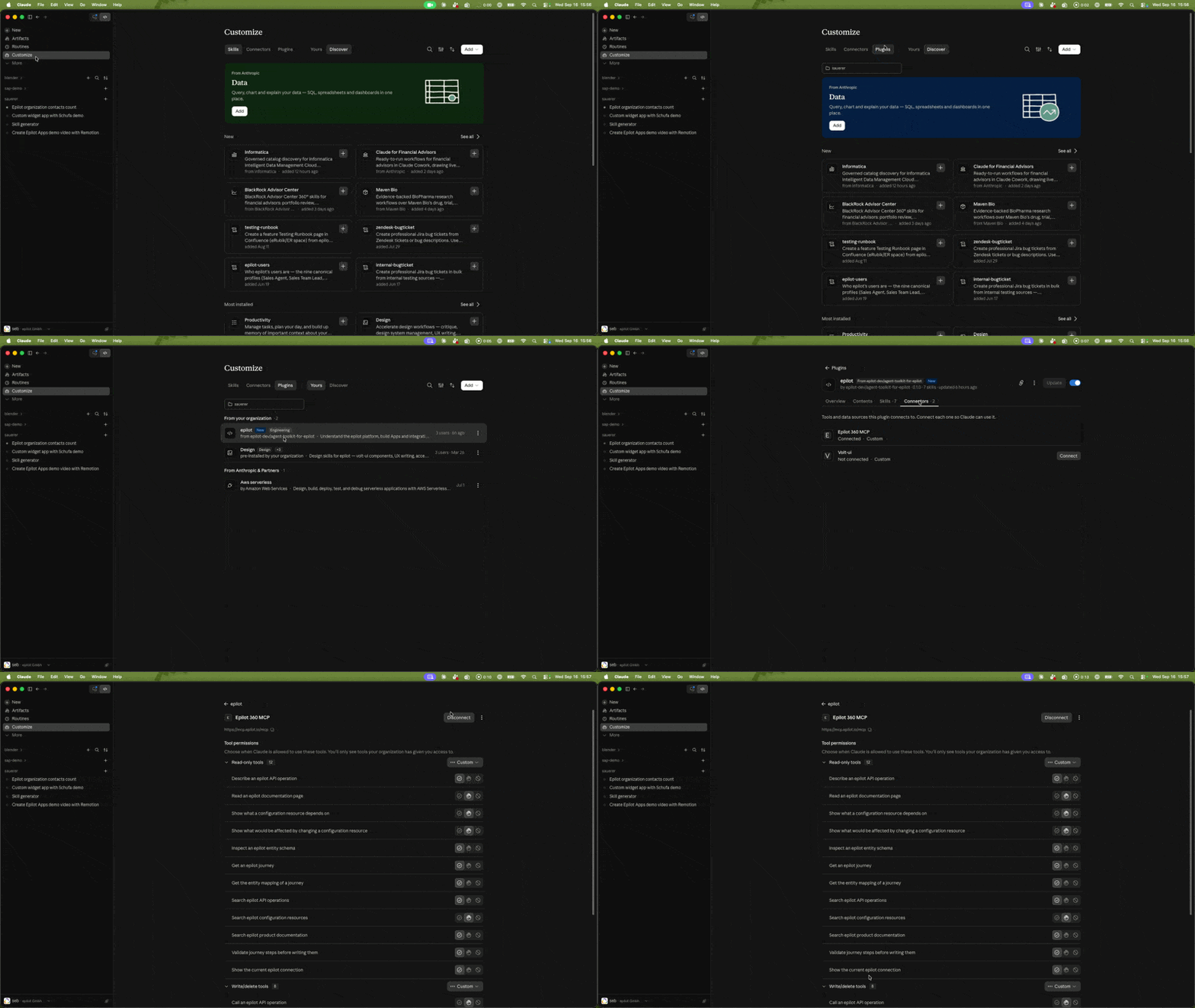
Switching between organizations (for example from the sandbox to production, or between two sandboxes) does not require reinstalling anything: disconnect the epilot MCP connector and connect it again. Reconnecting triggers the epilot login, where you pick a different organization and access level. In Claude, open Customize → Plugins → epilot → Connectors, select Epilot 360 MCP, and click Disconnect:
Keep production read-only
Granting the assistant write access to your production organization is possible, but not recommended — you do so at your own risk. Connect production with the read-only URL (https://mcp.epilot.io/mcp?access=read) so the assistant can answer questions about your live setup but can never change it, and keep write access confined to the sandbox.
To take the choice away entirely: in enterprise editions of ChatGPT and other major AI providers, administrators can allow only https://mcp.epilot.io/mcp?access=read in the MCP configuration for the production organization — the read/write selection then never appears on the login screen.
How your data is handled
The epilot MCP server never sees your prompts and sends nothing to a third-party AI provider. Your AI client sends it individual tool calls, the server runs each one against the epilot APIs as the signed-in user, and returns the result to your client. What your AI provider learns about your organization, it learns from those results inside your client. Three protections apply on the server before a result leaves epilot: your epilot permissions on every call, PII anonymization of entity data, and credential redaction for webhook, journey, and portal configuration. Every connection shows up as an integration token in epilot 360, and changes made by the assistant appear in the audit log under that token. Details are in the MCP server reference and the setup guide. Before you connect an assistant to a live organization, read the security best practices.
The two parts of the toolkit
You can use the two parts together or separately:
| epilot plugin | epilot MCP server | |
|---|---|---|
| What it is | A package of skills (guidance, decision rules, workflows) plus MCP configuration | A hosted server at https://mcp.epilot.io/mcp that exposes tools |
| What it gives the agent | How to work with epilot: architecture choices, App and integration patterns, configuration workflows, native UI design | What is true right now: your organization's configuration, entity schemas, published APIs, and documentation |
| Runs where | Inside the agent client (Claude, ChatGPT, Codex, and other Agent Plugins clients) | On epilot infrastructure; any MCP client can connect |
| Needs | A client that supports Agent Plugins | A client that supports remote MCP over HTTP with OAuth, and the MCP Server feature enabled in the organization |
| Identifier | epilot-core from the agent-toolkit-for-epilot marketplace | https://mcp.epilot.io/mcp |
The plugin includes the MCP server configuration. Installing the plugin connects the MCP server for you. Connecting the MCP server alone does not install the skills.
When to use what
Use the plugin when the agent will build or configure something and you want it to follow epilot's proven patterns:
- Building an App with the CLI, manifest, and App Bridge.
- Deciding between native configuration, an App, or an external integration.
- Configuring schemas, journeys, products, workflows, automations, or portals end to end.
- Designing App surfaces that look native with Volt UI components and tokens.
The plugin's skills route the task to the right workflow and load only the relevant guidance. They rely on the MCP server for live facts, so the two work best together.
Use the MCP server alone when you only need live access to an organization or the platform contracts:
- Your client offers MCP connectors but no plugins (Cursor, VS Code, custom agents), or you only need the live tools.
- You are asking questions about an organization: how it is set up, what depends on what, what would break if something changed.
- You are building your own agent and want tools rather than prompts.
- Compliance requires a read-only connection. Connect
https://mcp.epilot.io/mcp?access=readand writes are impossible regardless of consent.
Use neither when the task is plain code against the public APIs. The SDK and CLI are lighter, and llms.txt at https://docs.epilot.io/llms.txt gives any model the documentation index.
MCP server or CLI?
There is a third way for agents to reach epilot: the epilot CLI (npx epilot). Many platforms pair their agent tooling with a CLI — Datadog's pup CLI is a well-known example — because agents that already live in a terminal, like Claude Code and Codex, can drive a CLI without any connector setup: they discover operations through --help, call any API operation directly, and get --json output that is easy to parse.
The rule of thumb:
- Use the MCP server when the agent runs in a chat client without a terminal (Claude.ai, Claude Cowork, ChatGPT), when you want the OAuth consent flow with enforceable read-only access, or when you want the curated facade tools (
create_workflow,create_journey, configuration graph, dry runs before writing) instead of raw endpoints. - Use the CLI when the agent has shell access and the task maps to plain API operations — quick lookups, scripting, CI pipelines, or piping results through
jq. It is the leanest option: one command per API call, no server in between.
They complement each other rather than compete: the plugin's skills reach for the MCP server's tools for live configuration work, and a terminal agent can mix in CLI calls whenever a raw operation is all that is needed.
What is inside the plugin
The epilot-core plugin ships five skills and two MCP servers.
| Skill | Use it for |
|---|---|
| epilot platform guide | Explains entities, relations, journeys, workflows, Apps, and routes a requirement to configuration, App, or integration |
| Build an epilot App | Scaffolds, extends, validates, and troubleshoots Apps with the current CLI, manifest schema, and App Bridge |
| Integrate with epilot | Designs inbound, outbound, batch, webhook, and bidirectional connections without an App |
| Configure epilot | Sets up schemas, journeys, products, pricing, workflows, automations, portals, and permissions |
| Build an epilot journey | Creates and updates customer-facing forms and funnels, including logic, copy, and design |
| MCP server | Transport | Purpose |
|---|---|---|
epilot | Remote HTTP, https://mcp.epilot.io/mcp | Configuration graph, schemas, journeys, portals, API discovery and execution, documentation. See the MCP server reference. |
volt-ui | Remote HTTP, https://volt-ui.epilot.io/api/mcp | Volt UI components, props, and design tokens for App interfaces. |
Next steps
- Set up the toolkit in Claude, ChatGPT, Codex, or another MCP client.
- Browse the MCP server capabilities.
- Source: agent-toolkit-for-epilot on GitHub.