Sandboxes
[API Docs]
A Sandbox is a separate epilot organization where you can safely test configurations without affecting your production environment. Once validated, changes can be promoted to production.
How Sandboxes Work
Sandboxes are full epilot organizations with their own users, data, and configurations. They are linked to a production organization, enabling controlled promotion of changes.
| Sandbox | Production | |
|---|---|---|
| Purpose | Test and validate configurations | Live business operations |
| Blueprint installation | Supported | Not directly (sync from sandbox) |
| Data | Isolated test data | Live customer data |
info
Marketplace Blueprints can only be installed in sandbox organizations. After testing, sync configurations to production.
Setting Up a Sandbox
Requesting a Sandbox
If you don't have a sandbox yet:
- Contact your Customer Success or Sales representative, or
- Request one directly when installing a Blueprint from the Marketplace
Switching Between Organizations
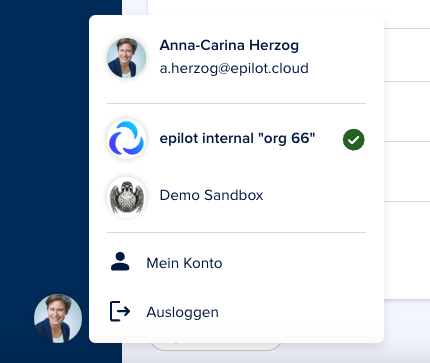
To navigate between sandbox and production, users must have accounts in both organizations with the same email address.
Switch organizations by clicking your initials in the bottom-left corner of epilot 360:
See Also
- Blueprints Overview -- What blueprints are and how to use them
- Installing a Blueprint -- Step-by-step installation
- Editing and Synchronizing -- Promoting changes between organizations
- Supported Resources -- All 34 resource types available in blueprints