Audit Logs
[SDK]
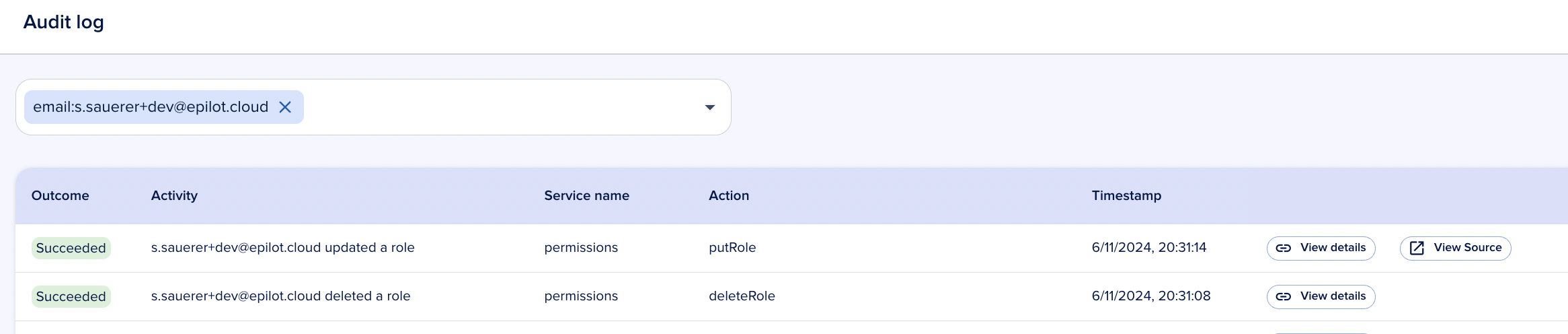
Audit logs provide a tamper-resistant record of activity across your epilot organization. They capture who did what, when, and on which resource — giving you the visibility you need for security reviews, compliance, and troubleshooting.
info
Audit logs are an enterprise-tier feature. Contact sales for details.
What is tracked
Audit logs focus on mutations — operations that change the state of your organization:
- Create — A new resource is created (e.g. a new entity, user, or webhook)
- Update — An existing resource is modified (e.g. editing an entity, changing permissions)
- Delete — A resource is removed (e.g. deleting an automation flow, removing a user)
Selected read operations are also logged when they are security-relevant, such as viewing sensitive configuration or exporting data.
tip
If you need audit coverage for an operation or service not yet tracked, contact support to request an addition.
Audited services
The following services currently emit audit log events:
| Service | Description |
|---|---|
| App | App installations and configuration changes |
| Automation | Automation flow create, update, and delete operations |
| Blueprint Manifest | Blueprint installations and manifest changes |
| Customer Portal | Portal configuration and settings changes |
| Email Settings | Email domain, sender, and routing configuration |
| Entity | Entity create, update, and delete across all schemas |
| ERP Integration API | ERP integration configuration and sync operations |
| Journey Config | Journey configuration and publishing changes |
| Permissions | Role and grant changes |
| User | User invitations, role assignments, and account changes |
| Webhooks | Webhook endpoint create, update, and delete operations |
note
Coverage expands over time. Not every API call within a service is logged — only the operations that modify resources or access sensitive data.
Log entry details
Each audit log entry contains:
| Field | Description |
|---|---|
| Timestamp | When the event occurred |
| User | The user or API token that triggered the action |
| Operation | The specific action performed (e.g. createEntity, updateRole) |
| Service | The service that emitted the event |
| Resource | The affected resource identifier |
| Changes | A diff of what changed, when available |
Permissions
Viewing audit logs requires the audit_log:view permission. Admin users have this by default. Assign it to other roles through access management.
Facade APIs
The Entity API is audited. Facade APIs (wrappers around the Entity API) are not separately audited to avoid duplicate entries. The underlying entity mutation is still captured.
Retention
Audit log entries are retained according to your organization's plan. Contact your account manager for details on retention periods and data export options.