Document Generation
Overview
The Document Generation API creates documents from templates with dynamic variable substitution. It supports multiple input and output formats, image embedding, Excel generation, and async processing with job tracking.
API Endpoints
Extract Template Metadata
Extract metadata and variables from document templates.
Endpoint: POST /v2/documents:meta
Supported formats: .docx, .doc, .xlsx, .xls, .xlsm
{
  "template_document": {
    "s3ref": {
      "bucket": "epilot-files-prod",
      "key": "123/templates/contract-template.docx"
    }
  }
}
{
  "page_margins": {
    "top": 1440,
    "bottom": 1440,
    "left": 1440,
    "right": 1440,
    "header": 720,
    "footer": 720
  },
  "variables": [
    "customer_name",
    "order.billing_contact.0.salutation",
    "items[0].description",
    "opportunities[Primary].value"
  ]
}
Generate Documents
Generate documents from templates with variable substitution.
Endpoint: POST /v2/documents:generate
Input formats: .docx, .xlsx, .xls, .xlsm, .ics
Output formats: .pdf, .docx, .xlsx, .ics
Query parameters:
| Parameter | Values | Default | Description |
|---|---|---|---|
job_id | string | -- | Track async generation status |
mode | partial_generation, full_generation | full_generation | Generation flow type |
preview_mode | open, download | open | Preview behavior |
{
  "template_document": {
    "s3ref": {
      "bucket": "epilot-files-prod",
      "key": "123/templates/invoice-template.docx"
    },
    "filename": "invoice-template.docx"
  },
  "context_entity_id": "550e8400-e29b-41d4-a716-446655440000",
  "user_id": "user_123",
  "language": "en",
  "variable_payload": {
    "custom_field": "Override value",
    "discount": 15
  },
  "template_settings": {
    "top_margin": 1440,
    "bottom_margin": 1440,
    "show_guidelines": false
  }
}
{
  "job_id": "job_550e8400",
  "job_status": "SUCCESS",
  "pdf": {
    "s3ref": {
      "bucket": "epilot-generated-documents",
      "key": "123/output/invoice.pdf"
    },
    "preview_url": "https://s3.amazonaws.com/...",
    "filename": "invoice.pdf"
  },
  "docx": {
    "s3ref": {
      "bucket": "epilot-generated-documents",
      "key": "123/output/invoice.docx"
    },
    "preview_url": "https://s3.amazonaws.com/...",
    "filename": "invoice.docx"
  },
  "variable_payload": {
    "customer_name": "John Doe",
    "custom_field": "Override value",
    "discount": 15
  }
}
Convert Documents
Convert documents between formats (currently DOCX to PDF).
Endpoint: POST /v2/documents:convert
{
  "input_document": {
    "s3ref": {
      "bucket": "epilot-files-prod",
      "key": "123/documents/contract.docx"
    }
  },
  "output_format": "pdf",
  "output_filename": "contract-converted.pdf",
  "language": "en"
}
{
  "output_document": {
    "s3ref": {
      "bucket": "epilot-generated-documents",
      "key": "123/converted/contract-converted.pdf"
    },
    "preview_url": "https://s3.amazonaws.com/...",
    "filename": "contract-converted.pdf"
  }
}
Template Variables
Basic Variable Syntax
Templates use double curly braces for variable substitution:
{{variable_name}}              // Simple variable
{{customer.name}}               // Nested object
{{address.street.number}}       // Deep nesting
{{items.0.price}}              // Alternative array syntax
{{opportunities[Primary].value}} // Label-lookup array access
{{data["special-key"]}}        // Bracket notation for special characters on Label Lookups
Variable Resolution Order
Variables resolve in this precedence order (highest first):
variable_payload-- explicitly provided valuescontext_data-- additional context data- Entity attributes from
context_entity_id - User preferences (language) from
user_id
Complex Variable Examples
// Customer information
{{customer.first_name}} {{customer.last_name}}
{{customer.address.0.street}}
{{customer.contacts[billing].email}}

// Order details with calculations
{{ calc "ROUND((price * qty) * (1 - discount), 2)" }}
{{order.total_amount}}

// Conditional display (in supported templates)
{{#has_discount}}
  Discount: {{discount_percentage}}%
{{/has_discount}}
You can find more examples about calculation variables here.
Image Variables
Basic Image Syntax
Images can be embedded in documents using the special syntax:
Direct Image URL
{{% image_url }}
This renders the image at its original size.
Image with Size Control
Use an image placeholder in your template and set the variable in the alt text:
- Insert an image placeholder in your Word/Excel template
- Set the alt text to:
{{% image_url }} - The placeholder image dimensions will control the rendered size
Image Loops and Collections
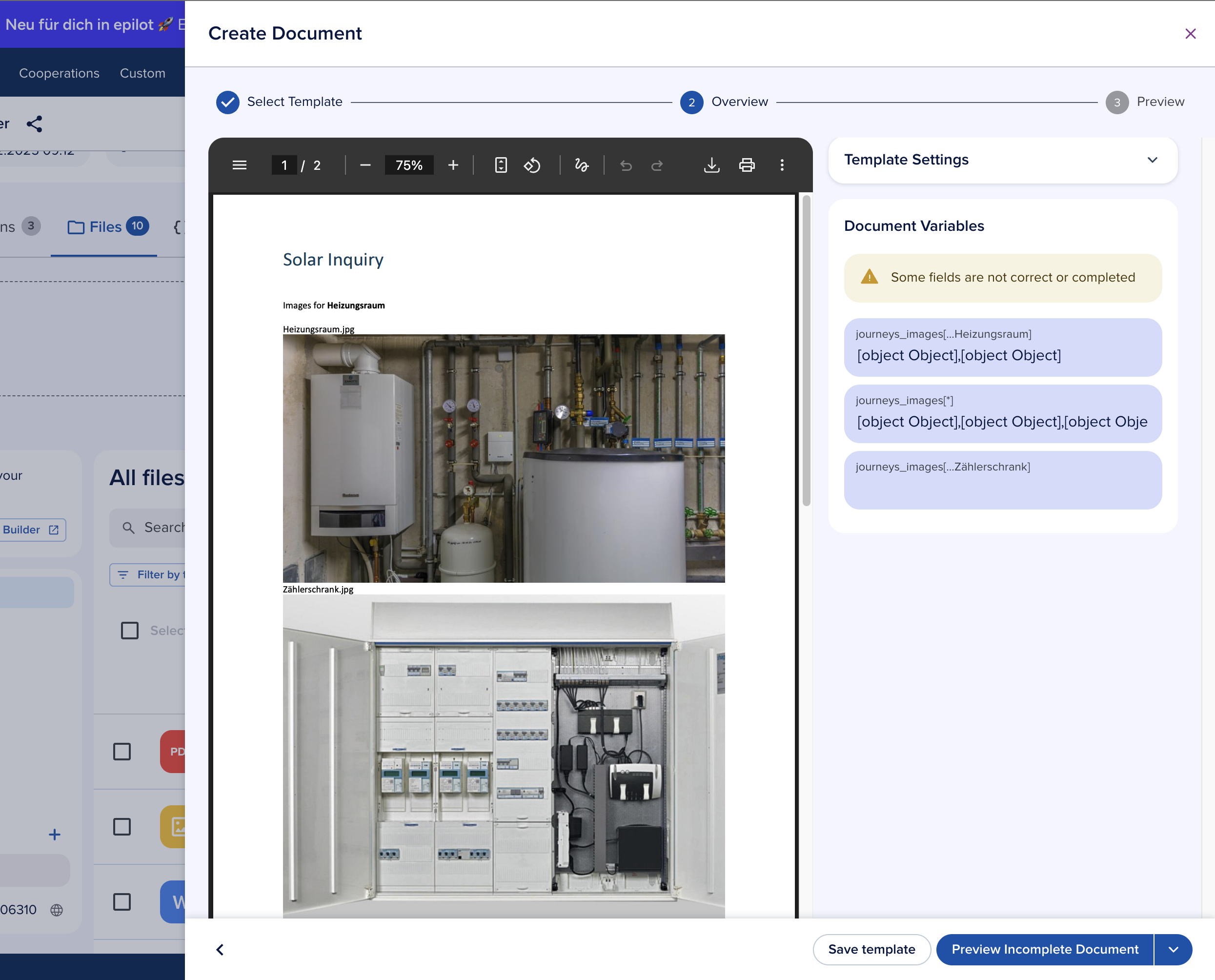
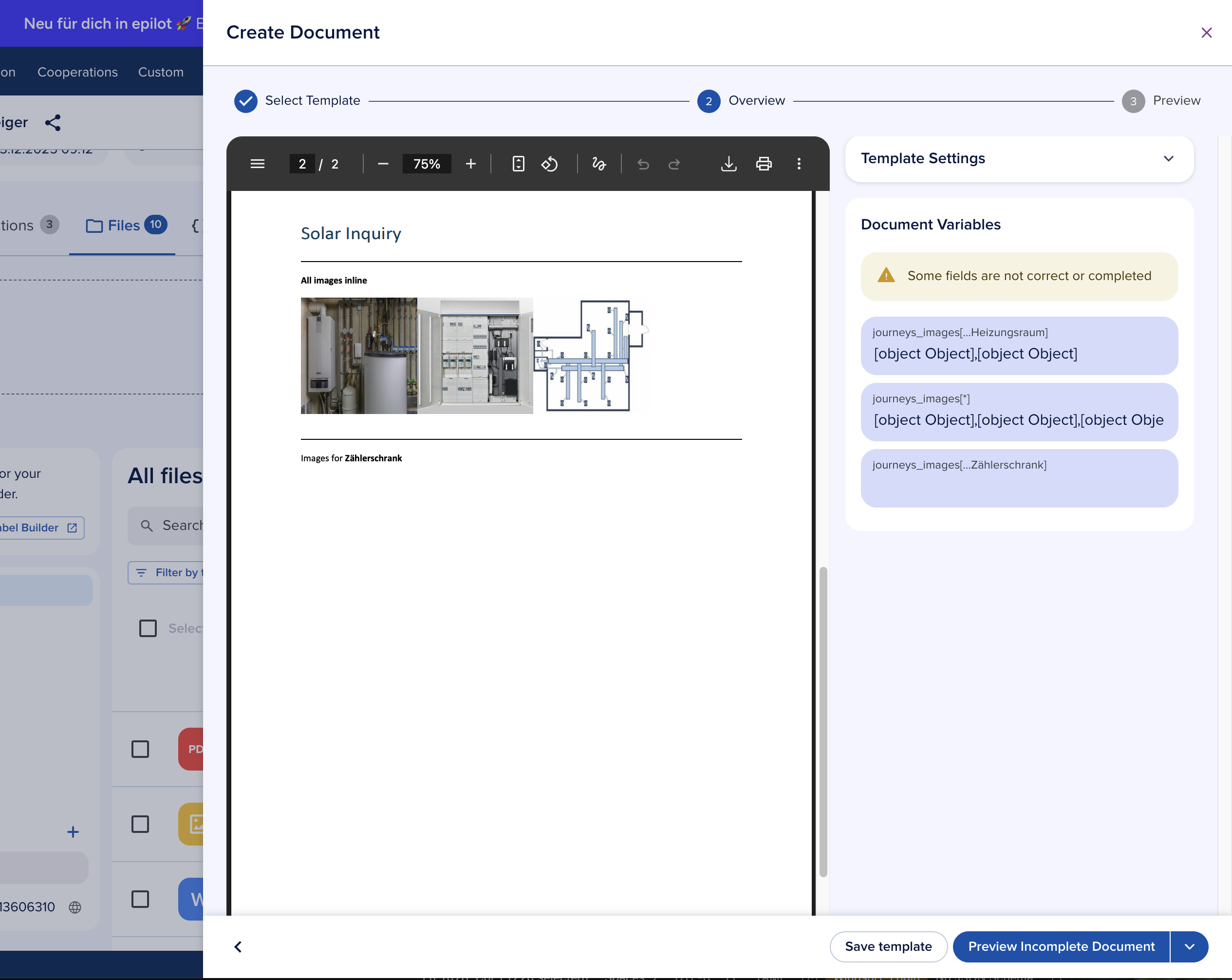
Mapping Journey Submissions to File Attributes
Since the global _files attribute is not yet supported, you need to map Journey submission fields to file attributes. For example, map a journey field to my_journey_images.
Basic Image Loop
{{#my_journey_images[*]}}
    {{% public_url }}
{{/my_journey_images[*]}}
This iterates through all images in the collection.
Filtered Image Loop by Label
{{#my_journey_images[...solar-panel]}}
    {{% public_url }}
{{/my_journey_images[...solar-panel]}}
This only includes images with the label "solar-panel".
Complete Example with Formatting
{{#property_images[*]}}
    Property Image:
    {{% public_url }}

    Description: {{ _title }}
    Uploaded: {{ _created_at }}
{{/property_images[*]}}
Automatic Public URL Generation
The service automatically handles private images by converting them to signed URLs with temporary access credentials. These URLs expire shortly after document processing completes.
warning
Order tables with margin corrections are incompatible with loops. Templates using {{~order_table mt=2 mb=2}} cannot include image loops or any FOR_LOOP constructs. Remove margin correction variables and adjust margins directly in Word's built-in settings instead.
Excel Generation
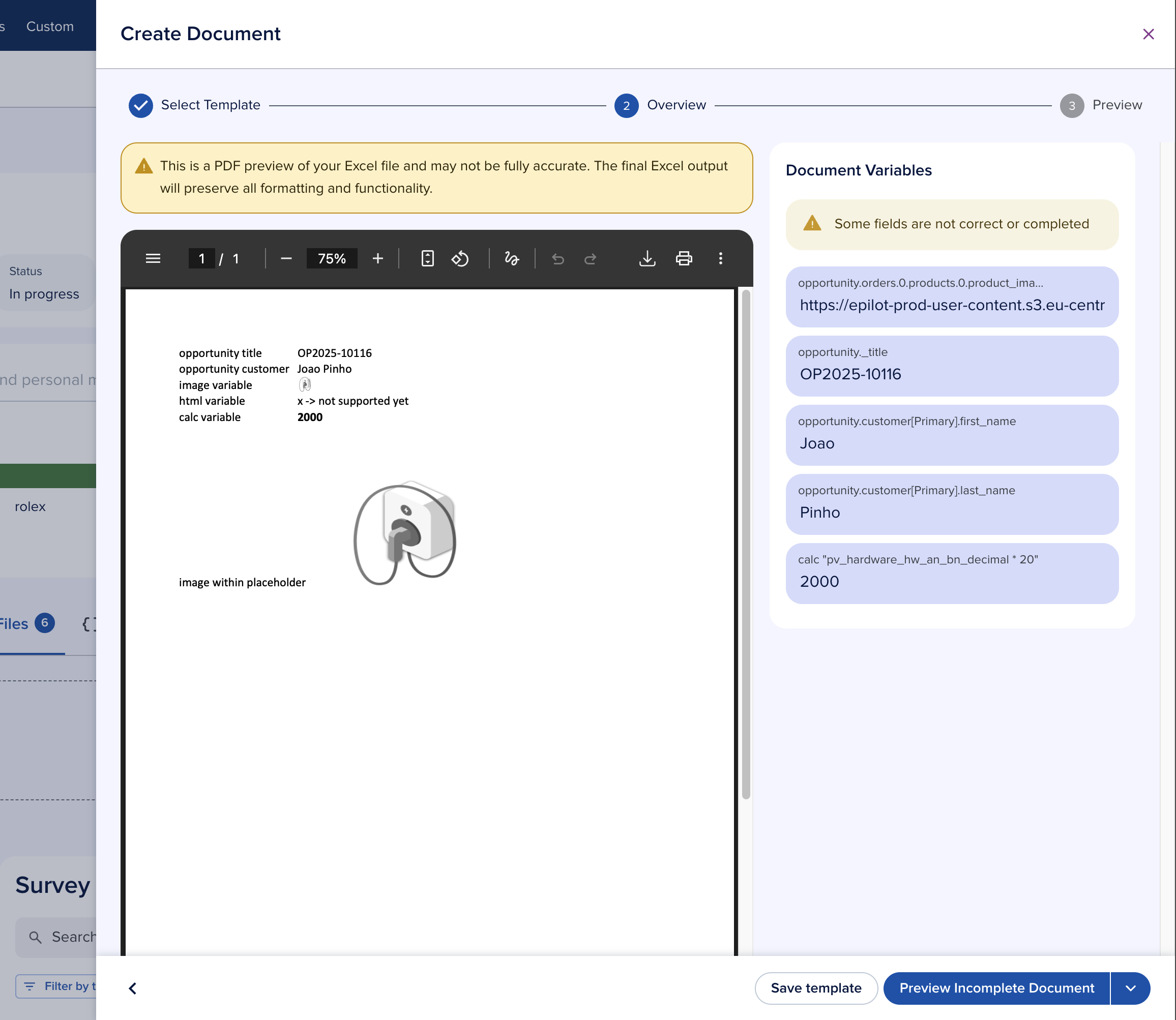
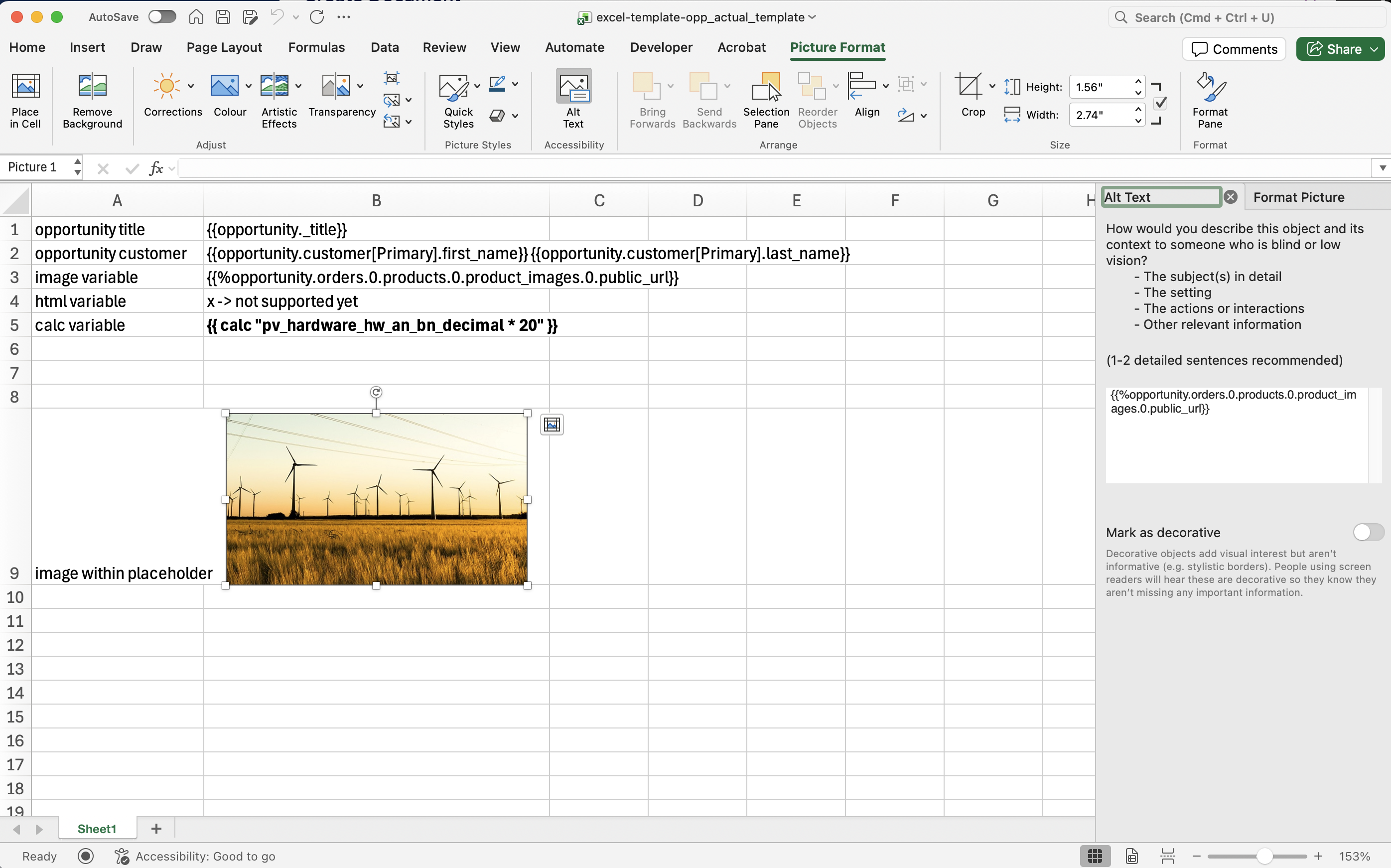
Excel Template Support
The Document Generation API supports Excel templates with:
- Variable substitution in cells
- Formula preservation (recalculation is not supported due to Excel's security model)
- Image embedding in spreadsheets
note
Order Table variables are not supported in Excel templates due to Excel's limitations with direct HTML rendering.
Excel Variable Syntax
Cell Variables
A1: {{customer_name}}
B1: {{order_date}}
Images in Excel
Cell A1: {{% product_image }}
Cell B2: {{% chart_url }}
Excel Generation Example
Request:
{
  "template_document": {
    "s3ref": {
      "bucket": "epilot-files-prod",
      "key": "templates/report-template.xlsx"
    }
  },
  "context_entity_id": "550e8400-e29b-41d4",
  "variable_payload": {
    "report_title": "Q4 Sales Report",
    "sales_data": [
      {"month": "October", "revenue": 125000},
      {"month": "November", "revenue": 145000},
      {"month": "December", "revenue": 168000}
    ],
    "chart_image": "https://charts.example.com/q4-sales.png"
  }
}
Troubleshooting
Variables not replaced
- Verify
{{}}bracket syntax - Check that the variable exists in the payload or entity
- Remember that
variable_payloadoverrides entity data
Image not rendering
- Use
{{% url }}with the correct syntax - Confirm the image URL is accessible
- When using label filters, verify images have the correct labels
Loop syntax errors
- Use
[*]for all items,[...label]for filtered - Ensure matching opening and closing loop tags
- Remove
{{~order_table mt=2 mb=2}}when using loops
Code Examples
cURL
curl -X POST https://api.epilot.cloud/v2/documents:meta \
  -H "Authorization: Bearer $TOKEN" \
  -H "Content-Type: application/json" \
  -d '{
    "template_document": {
      "s3ref": {
        "bucket": "epilot-files-prod",
        "key": "templates/contract.docx"
      }
    }
  }'
curl -X POST https://api.epilot.cloud/v2/documents:generate \
  -H "Authorization: Bearer $TOKEN" \
  -H "Content-Type: application/json" \
  -d '{
    "template_document": {
      "s3ref": {
        "bucket": "epilot-files-prod",
        "key": "templates/invoice.docx"
      }
    },
    "context_entity_id": "550e8400-e29b-41d4-a716-446655440000",
    "variable_payload": {
      "custom_message": "Thank you for your business!"
    }
  }'
Template Settings
Customize document margins and appearance:
{
  "template_settings": {
    "top_margin": 1440,
    "bottom_margin": 1440,
    "left_margin": 1080,
    "right_margin": 1080,
    "show_guidelines": false,
    "enable_headers": true,
    "enable_footers": true
  }
}
Async Job Tracking
For large documents, poll the generation endpoint with the returned job_id:
const { job_id } = await client.generateDocument({ ... });

const poll = async (jobId: string) => {
  const res = await client.generateDocument({ job_id: jobId });

  if (res.job_status === 'SUCCESS') {
    return res.pdf.preview_url;
  } else if (res.job_status === 'FAILED') {
    throw new Error('Generation failed');
  }

  // Still processing -- retry after delay
  await new Promise((r) => setTimeout(r, 2000));
  return poll(jobId);
};